

Echo Show 15 or Nest Hub Max? For family calendar?

The Amazon Echo Show 15 is the better choice for most families who want a shared calendar displayed prominently in the kitchen or another common area. Its large 15.6-inch Full HD screen and customizable widgets make it well suited to showing appointments, reminders, and household lists. The Google Nest Hub Max is a better fit for families who already use Google Calendar and prefer Google’s smart home ecosystem.
Echo Show 15 vs. Nest Hub Max: Key Differences for Family Calendars
Both smart displays can help a household keep track of appointments, school activities, reminders, and daily plans. The main difference is how they display that information and which calendar system they support. The Echo Show 15 focuses on a large, customizable home dashboard, while the Nest Hub Max works naturally with shared Google Calendars.
| Feature | Amazon Echo Show 15 | Google Nest Hub Max |
|---|---|---|
| Screen size | 15.6-inch Full HD | 10-inch HD |
| Voice assistant | Amazon Alexa | Google Assistant |
| Calendar system | Alexa-supported calendars | Google Calendar |
| Calendar display | Customizable widgets | Daily and weekly calendar views |
| Placement | Wall-mounted or tabletop with a suitable stand | Tabletop or shelf |
| Household lists | Calendar, reminders, shopping lists, and other widgets | Google Assistant features and compatible services |
| Best for | A visible family command center | Families already using Google services |
| Available |  | |
The Echo Show 15’s display and widget features make it well suited to a shared family dashboard. The Nest Hub Max is a practical alternative for households that already use Google Calendar and other Google services.
Why the Echo Show 15 Is Better for a Visible Family Calendar
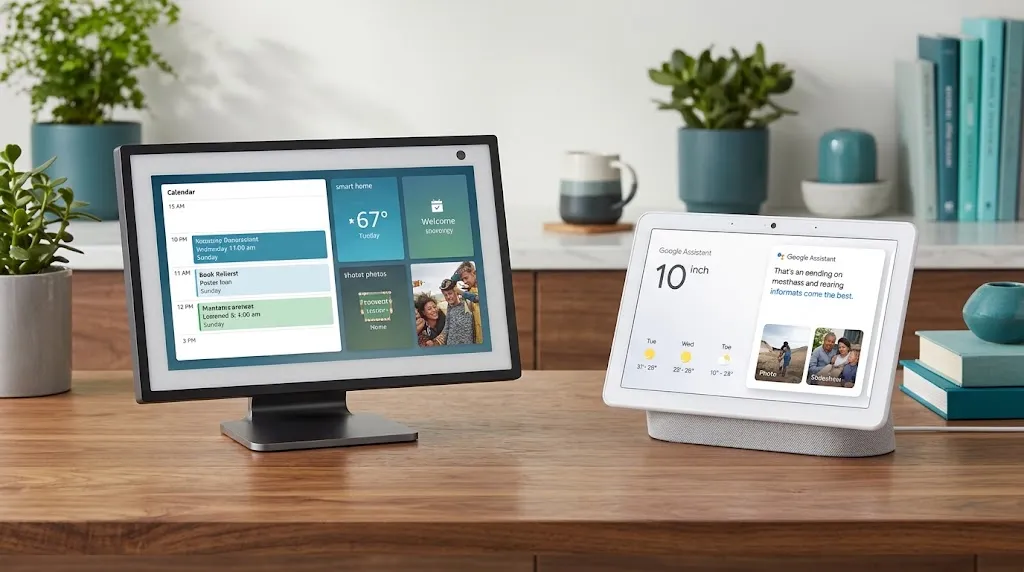
The biggest advantage of the Echo Show 15 is its large screen. At 15.6 inches, it provides considerably more space for family members to check schedules without crowding around a small display.
Its customizable widgets can put calendar information, reminders, shopping lists, and other useful tools on the home screen. That makes it a practical option for a kitchen, hallway, or shared family workspace.
What makes it useful for busy families?
- Easier to read: The large screen is helpful when several people need to check the schedule.
- Customizable layout: Arrange available widgets around the information your family uses most.
- Shared household planning: Keep appointments and reminders visible in a common area.
- Entertainment options: The built-in Fire TV experience lets family members watch supported streaming content when the screen is not being used for planning.
- Alexa voice control: Ask Alexa for supported calendar information or use voice commands to manage compatible features.
The second-generation Echo Show 15 also includes a 13-megapixel camera with a physical camera cover, along with upgraded speakers.
Where the Echo Show 15 falls short
A large screen does not automatically make calendar management easier. You still need to connect the appropriate accounts, configure widgets, and decide which information should remain visible.
Calendar compatibility also matters. If your family relies on Google Calendar, verify that your particular calendars and the actions you need work with Alexa before buying. Do not assume that every Google Calendar feature transfers directly to the Echo Show.
Why the Nest Hub Max May Be Better for Google Calendar Users
The Nest Hub Max is a strong alternative for families that already organize their lives through Google Calendar and Google Home. Its 10-inch touchscreen is smaller than the Echo Show 15, but it can display calendar information and provide voice access to supported events.
What makes it useful for family scheduling?
- Shared Google Calendars: You can enable supported shared and family calendars linked to eligible Google accounts.
- Voice-assisted planning: Ask about upcoming events or add supported appointments with voice commands.
- Personalized information: With the required setup, different household members can access personalized results.
- Google Photos: Use the display for family photos when you are not checking the schedule.
- Video calling: The built-in camera supports compatible video-calling features.
Where the Nest Hub Max falls short
The 10-inch screen offers less space for a shared schedule that several people need to read from across a room. Google also supports daily and weekly calendar views on Nest displays rather than a full monthly calendar view.
There is another practical limitation: voice commands cannot perform every calendar-editing task. Some changes, cancellations, and invitation management must be handled in Google Calendar on a phone or computer.
If your goal is a large, always-visible household noticeboard, the smaller screen may be less convenient. If your priority is working with Google services, however, the Nest Hub Max can still be the more natural fit.
Which Smart Display Works Better for Different Family Situations?
The right choice depends on how your household manages appointments and where you plan to put the device.
| Family situation | Better choice | Reason |
|---|---|---|
| Parents and children need to check a schedule from across the kitchen | Echo Show 15 | Larger screen and customizable widgets |
| Everyone already shares events through Google Calendar | Nest Hub Max | Integration with supported Google Calendars |
| You want a wall-mounted family dashboard | Echo Show 15 | Designed for wall mounting |
| You want Google Photos and Google Home features together | Nest Hub Max | Fits naturally into Google’s ecosystem |
| You want calendar information alongside shopping lists and reminders | Echo Show 15 | Calendar and other available widgets can share the home screen |
| You prefer voice-assisted access to Google Calendar | Nest Hub Max | Supports compatible Google Calendar queries and actions |
These recommendations reflect the devices’ general features, not a guarantee that every account or calendar configuration will behave identically.
Real-World Examples: Which One Would Your Family Prefer?
A family coordinating school, work, and activities
Imagine a household where one parent has early meetings, another manages school pickups, and the children have sports practices throughout the week.
A wall-mounted Echo Show 15 could make a convenient shared planning station. Family members could check the visible calendar widget and available reminders while passing through the kitchen.
The main advantage is visibility. However, the family should first confirm that its preferred calendar service connects properly to Alexa.
A family that already uses Google Calendar
Consider a household where parents share a Google Calendar and add appointments directly from their phones. They also use Google Home to control compatible lights and other devices.
The Nest Hub Max makes sense because it works with supported shared Google Calendars. The family can enable the calendars it wants the display to access and use voice commands to check upcoming events.
In this situation, a smaller screen may be an acceptable trade-off because the existing calendar system is already familiar.
What Should You Check Before Buying?

Before choosing either display, review these practical details.
- Calendar compatibility: Check that your current calendar provider supports the actions you need on the device.
- Shared access: Make sure each relevant account has the permissions required to view or edit family events.
- Screen placement: Consider whether everyone will read the calendar from a distance or use it up close.
- Editing appointments: Determine whether you can make the changes you need by voice or must use a phone or computer.
- Privacy: Review account permissions, personalized results, camera controls, and which family information will be visible on the screen.
- Current availability and price: Check current manufacturer information before committing, especially because product availability and promotions can change.
One detail is easy to overlook: a shared calendar and a shared display are not the same thing. Connecting one person’s account does not necessarily make every family member’s calendar visible. Configure the correct accounts and permissions first.
Frequently Asked Questions
Choosing between the Echo Show 15 and Nest Hub Max for a family calendar can depend on your preferred calendar app, screen size, and how your household manages daily schedules. These frequently asked questions cover calendar compatibility, shared access, and the key differences to help you choose the right smart display for your family.
Can the Echo Show 15 display a shared family calendar?
Yes. The Echo Show 15 supports calendar widgets and household planning features. The exact calendars and actions available depend on the connected accounts and supported services, so verify compatibility before purchasing.
Can the Nest Hub Max show multiple family members’ Google Calendars?
It can access supported shared and family Google Calendars after the relevant accounts and calendars are configured. Personal results, account permissions, and calendar compatibility affect what the display can show.
Is the Echo Show 15 worth choosing over the Nest Hub Max just for the screen?
For a shared calendar intended to be read across a kitchen or common room, the Echo Show 15’s 15.6-inch display is a meaningful advantage over the Nest Hub Max’s 10-inch screen. But if your family depends on Google Calendar, check compatibility first rather than choosing based on screen size alone.
Final Verdict
The Amazon Echo Show 15 is the overall winner for families who want a large, visible calendar and a customizable household dashboard. Its 15.6-inch Full HD screen, wall-mounting design, and widgets make it especially useful in a shared area of the home.
The Google Nest Hub Max is the better choice for families already committed to Google Calendar and Google Home. Its smaller display is less suited to a large wall calendar, but its Google integration can make everyday scheduling more convenient.